Over ten episodes we took one idea from a single API call to a production system. In Part 1 we provisioned Foundry with Bicep and generated our first product description. Part 2 added private endpoints and RBAC, Part 3 compared models, and Part 4 introduced the Foundry Agent Service, prompt agents and hosted agents. After that came structured outputs (Part 5), FastAPI on Container Apps (Part 6), grounding with PostgreSQL and Azure AI Search (Part 7), evaluations and tracing (Part 8), content safety (Part 9) and CI/CD with GitLab (Part 10).
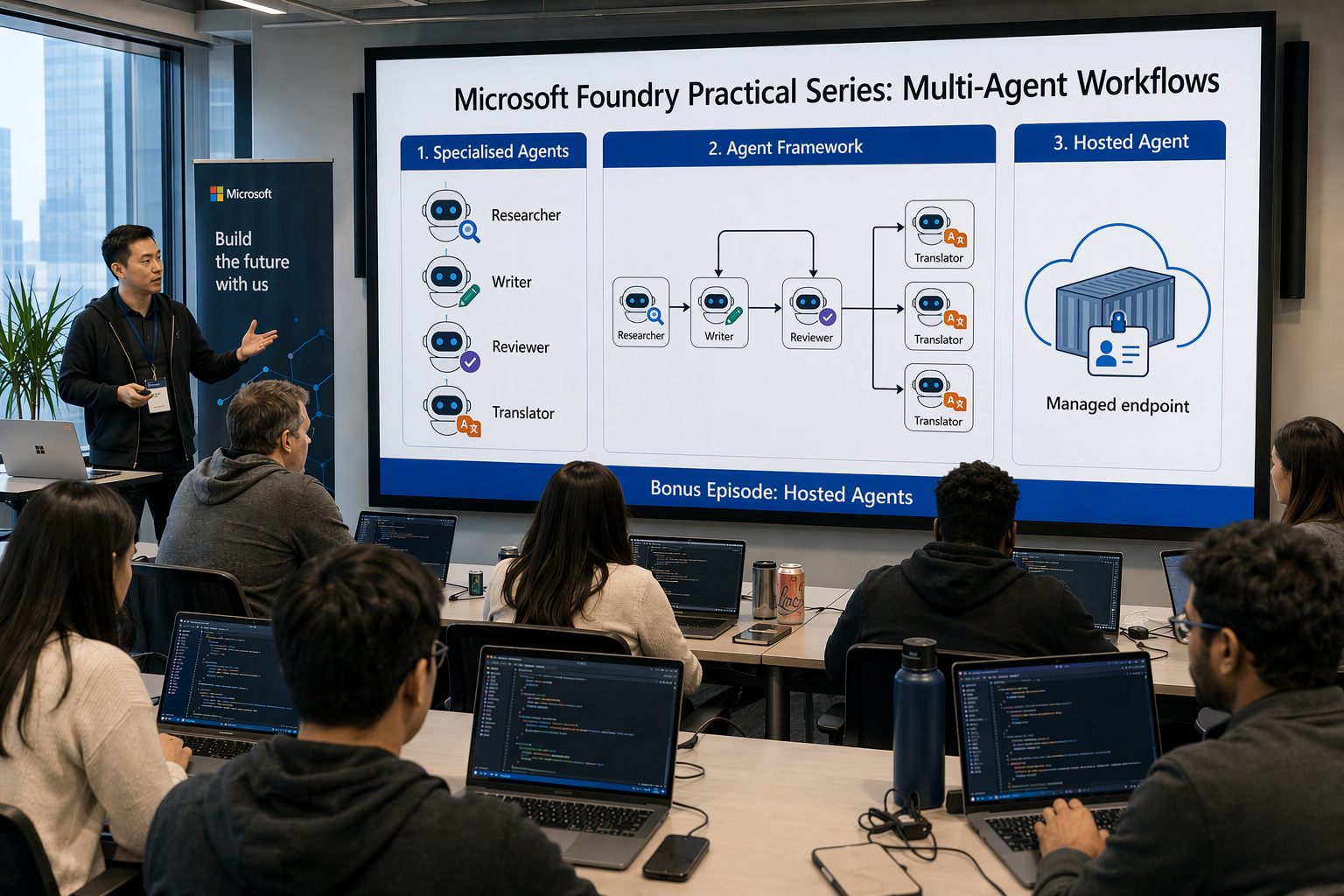
In Part 4 I promised we’d come back to hosted agents. This is that episode.
Our product description generator has grown. One system prompt now has to look up the catalog, check trends, write SEO copy, return valid JSON, follow brand rules, stay safe, and translate. Each new rule makes the prompt longer, harder to evaluate and easier to break. When a prompt has that many jobs, it’s time to split it into specialised agents that each do one thing well, and to run them as one workflow.
In this post we will:
- Decide when to split: one agent vs many, and what it costs
- Compare orchestration patterns in Microsoft Agent Framework: sequential, concurrent, handoff, group chat, Magentic and custom graphs
- Build a multi-agent content workflow with a Researcher, a Writer, a Compliance reviewer that can send work back, and Translators that run in parallel
- Run it locally with streaming events
- Package it as a hosted agent and deploy it to Foundry with
azd - Lock down identity and RBAC for the agent and its callers
- Call it from the FastAPI app through the Responses API
- Trace, evaluate and cost the workflow
- Compare prompt agents, hosted agents and a DIY container
All code samples from this series are available in this repository.
One agent or many? #
Multi-agent setups are popular right now, but more agents mean more tokens, more latency and more parts that can break. My rule: split only when one agent visibly struggles, or when parts of the job need different models, tools or permissions.
| Signal | One agent is enough | Split into specialised agents |
|---|---|---|
| Instructions length | Fits on one screen | Several pages of competing rules |
| Tools | 1–3 related tools | Many tools with different risk levels |
| Models | One model works for every step | Different steps need different model sizes |
| Quality loop | Single pass is good enough | Output must be checked and revised |
| Parallelism | Nothing to parallelise | Independent sub-tasks (e.g. locales) |
| Permissions | Same data access throughout | Some steps must not see some data |
| Evaluation | One score tells you enough | You need to know which step failed |
Our generator now matches almost every row on the right, so splitting it makes sense.
Microsoft Agent Framework in 60 seconds #
Microsoft Agent Framework (MAF) is Microsoft’s open-source SDK for agents and multi-agent workflows in Python and .NET. It’s the successor to Semantic Kernel’s agent framework and AutoGen. We use four building blocks: FoundryChatClient (talks to a model deployment through the project endpoint), Agent with @tool functions (instructions + model + tools + optional structured output), WorkflowBuilder and the agent_framework.orchestrations builders (typed graphs with streaming, checkpoints and human-in-the-loop), and ResponsesHostServer (serves an agent or workflow inside a hosted agent container).
The core, Foundry and orchestration packages are stable. The hosting package is still beta, so it needs --pre:
1python -m venv .venv
2source .venv/bin/activate
3pip install agent-framework-core agent-framework-foundry agent-framework-orchestrations \
4  azure-identity python-dotenv "psycopg[binary]"
5pip install --pre agent-framework-foundry-hosting
Note: The framework changes fast. The API names below match the agent-framework repository at the time of writing. If an import fails, check the samples under
python/samples/first.
Orchestration patterns #
MAF has five ready-made orchestrations in agent_framework.orchestrations, plus the lower-level WorkflowBuilder for custom graphs:
| Pattern | Builder | How control flows | Fits our generator? |
|---|---|---|---|
| Sequential | SequentialBuilder | A → B → C, shared conversation | Research → write, but there’s no revision loop |
| Concurrent | ConcurrentBuilder | Same input to all agents in parallel, results aggregated | Translations |
| Handoff | HandoffBuilder | Agents decide who takes over next | Customer support triage, not content |
| Group chat | GroupChatBuilder | A manager or selector picks the next speaker | Brainstorming, debate |
| Magentic | MagenticBuilder | A manager agent plans, delegates and re-plans | Open-ended research, often too expensive for a catalog job |
| Custom graph | WorkflowBuilder | Your executors and edges, conditions, fan-out/fan-in | Yes: a loop plus a fan-out |
The ready-made builders take one line each, for example SequentialBuilder(participants=[researcher, writer]).build(). Our process needs a conditional loop (the reviewer can reject a draft) followed by a parallel fan-out (translations). That doesn’t fit a single ready-made pattern, so we’ll build a custom graph.
The product content workflow #
1 "SKU ..." ─► Researcher ─► Writer ─► capture_draft ─► Compliance ─► review_gate
2  (catalog + web search)     ▲   (ProductDescription)   (brand rules)     │
3                             └──────────── rejected (max 2×) ─────────────┤
4                                                                approved  ▼
5                                    publish ◄── de-DE / fr-FR / nl-NL ◄── localize
6                                  (fan-in, JSON)   (in parallel)          (fan-out)
Each agent has one job, its own instructions and, where possible, a smaller model:
| Agent | Model | Tools | Output |
|---|---|---|---|
| Researcher | gpt-4.1-mini | get_product_details (PostgreSQL), web search | Plain-text research notes |
| Writer | gpt-4.1 | None | ProductDescription |
| Compliance | gpt-4.1-mini | None | ReviewResult |
| Translators ×3 | gpt-4.1-mini | None | ProductDescription |
Models and tools #
ProductDescription is exactly the Pydantic model from Part 5 (sku, locale, title, tagline, description, bullet_points, care_instructions, seo, tags, missing_information). We copy app/models.py from the FastAPI app into the agent project unchanged and import it, so the API and the workflow share one schema. get_product_details is the catalog tool from Part 7, rewritten as an Agent Framework @tool. It reads PostgreSQL without a password, using an Entra token for whatever identity the code runs as: your az login user locally, the agent identity in Foundry.
 1# content_workflow/tools.py
 2import json
 3import os
 4from typing import Annotated
 5
 6import psycopg
 7from agent_framework import tool
 8from azure.identity import DefaultAzureCredential
 9from pydantic import BaseModel, Field
10
11from app.models import ProductDescription  # unchanged Part 5 model
12
13credential = DefaultAzureCredential()
14
15
16class ReviewResult(BaseModel):
17    approved: bool
18    issues: list[str] = Field(description="Concrete, fixable problems; empty if approved")
19
20
21@tool(approval_mode="never_require")
22def get_product_details(
23    sku: Annotated[str, Field(description="Product SKU, e.g. KB-MEC-2026")],
24) -> str:
25    """Fetch product facts (name, price, features, stock) from the catalog database."""
26    token = credential.get_token("https://ossrdbms-aad.database.windows.net/.default").token
27    with psycopg.connect(
28        host=os.environ["PGHOST"],
29        dbname=os.environ.get("PGDATABASE", "catalog"),
30        user=os.environ["PGUSER"],  # Entra principal name mapped in PostgreSQL
31        password=token,
32        sslmode="require",
33    ) as conn:
34        row = conn.execute(
35            "SELECT name, category, price::float, currency, stock_quantity, specs, features "
36            "FROM products WHERE sku = %s",
37            (sku.strip().upper(),),
38        ).fetchone()
39    if row is None:
40        return json.dumps({"error": f"SKU {sku} not found"})
41    keys = ("name", "category", "price", "currency", "stock_quantity", "specs", "features")
42    return json.dumps({"sku": sku, **dict(zip(keys, row))})
approval_mode="never_require" is fine here because the tool only reads data. For tools that write data, such as publishing to the shop, use approval_mode="always_require". The workflow then pauses and waits for a human to approve.
Agents #
 1# content_workflow/agents.py
 2import os
 3
 4from agent_framework import Agent
 5from agent_framework.foundry import FoundryChatClient
 6from azure.identity import DefaultAzureCredential
 7
 8from app.models import ProductDescription
 9
10from .tools import ReviewResult, get_product_details
11
12BRAND_RULES = """- Tone: confident, friendly, no hype words ("revolutionary", "best ever").
13- Never claim health, safety or environmental benefits that are not in the catalog facts.
14- Never mention competitors by name.
15- Price and specs must match the catalog facts exactly.
16- No content that is violent, hateful, sexual or encourages self-harm (Part 9 policy)."""
17
18
19def _client(model_env: str) -> FoundryChatClient:
20    return FoundryChatClient(
21        project_endpoint=os.environ["FOUNDRY_PROJECT_ENDPOINT"],
22        model=os.environ[model_env],
23        credential=DefaultAzureCredential(),
24    )
25
26
27def create_agents() -> dict[str, Agent]:
28    small = _client("SMALL_MODEL")    # gpt-4.1-mini
29    large = _client("WRITER_MODEL")   # gpt-4.1
30
31    researcher = Agent(
32        client=small,
33        name="researcher",
34        instructions=(
35            "You research products for copywriters. Always call get_product_details first. "
36            "Then use web search for 2-3 current buying trends or keywords for the category. "
37            "Return concise bullet notes: FACTS (from catalog only) and TRENDS (with sources). "
38            "Never invent specifications."
39        ),
40        tools=[get_product_details, FoundryChatClient.get_web_search_tool(search_context_size="low")],
41        default_options={"store": False},
42    )
43
44    writer = Agent(
45        client=large,
46        name="writer",
47        instructions=(
48            "You are an e-commerce copywriter. Write an SEO-friendly product description "
49            "with locale en-GB using ONLY the facts provided. Weave in trends where relevant.\n"
50            f"Brand rules:\n{BRAND_RULES}"
51        ),
52        default_options={"response_format": ProductDescription, "store": False},
53    )
54
55    compliance = Agent(
56        client=small,
57        name="compliance",
58        instructions=(
59            "You are a strict brand and compliance reviewer. Check the product description "
60            f"against these rules:\n{BRAND_RULES}\n"
61            "Approve only if every rule passes. Otherwise list each issue as a concrete fix."
62        ),
63        default_options={"response_format": ReviewResult, "store": False},
64    )
65
66    translators = {
67        f"translator_{locale[:2]}": Agent(
68            client=small,
69            name=f"translator_{locale[:2]}",
70            instructions=(
71                f"Translate the product description JSON into {locale} and set locale to {locale}. Keep the same structure, "
72                "localise idioms and units, keep brand and product names untranslated."
73            ),
74            default_options={"response_format": ProductDescription, "store": False},
75        )
76        for locale in ("de-DE", "fr-FR", "nl-NL")
77    }
78
79    return {"researcher": researcher, "writer": writer, "compliance": compliance, **translators}
store=False prevents the agents from chaining server-side state through previous_response_id. As a result, every workflow run starts from a clean state.
The workflow graph #
Agents can be used directly as graph nodes. The glue between them is a few small executors: plain async functions that receive typed messages, read and write workflow state, and decide where to send the next message.
 1# content_workflow/workflow.py
 2import json
 3from typing import Never
 4
 5from agent_framework import (
 6    AgentExecutorRequest,
 7    AgentExecutorResponse,
 8    Message,
 9    Workflow,
10    WorkflowBuilder,
11    WorkflowContext,
12    executor,
13)
14
15from app.models import ProductDescription
16
17from .agents import create_agents
18from .tools import ReviewResult
19
20MAX_REVISIONS = 2
21
22
23@executor(id="capture_draft")
24async def capture_draft(response: AgentExecutorResponse, ctx: WorkflowContext[AgentExecutorRequest]) -> None:
25    draft = ProductDescription.model_validate_json(response.agent_response.text)
26    ctx.set_state("draft", draft.model_dump_json())
27    # The reviewer only sees the draft, not the whole research conversation: fewer tokens.
28    await ctx.send_message(AgentExecutorRequest(
29        messages=[Message("user", [f"Review this product description:\n{draft.model_dump_json()}"])],
30        should_respond=True,
31    ))
32
33
34@executor(id="review_gate")
35async def review_gate(response: AgentExecutorResponse, ctx: WorkflowContext[AgentExecutorRequest | str]) -> None:
36    review = ReviewResult.model_validate_json(response.agent_response.text)
37    revisions = ctx.get_state("revisions", 0)
38    draft = ctx.get_state("draft")
39
40    if review.approved or revisions >= MAX_REVISIONS:
41        ctx.set_state("review", review.model_dump())
42        await ctx.send_message(draft, target_id="localize")
43        return
44
45    ctx.set_state("revisions", revisions + 1)
46    feedback = "\n".join(f"- {issue}" for issue in review.issues)
47    await ctx.send_message(
48        AgentExecutorRequest(
49            messages=[Message("user", [f"Revise this draft. Fix these issues:\n{feedback}\n\nDraft:\n{draft}"])],
50            should_respond=True,
51        ),
52        target_id="writer",
53    )
54
55
56@executor(id="localize")
57async def localize(draft_json: str, ctx: WorkflowContext[AgentExecutorRequest]) -> None:
58    await ctx.send_message(AgentExecutorRequest(messages=[Message("user", [draft_json])], should_respond=True))
59
60
61@executor(id="publish")
62async def publish(results: list[AgentExecutorResponse], ctx: WorkflowContext[Never, str]) -> None:
63    draft = ProductDescription.model_validate_json(ctx.get_state("draft"))
64    translations = [ProductDescription.model_validate_json(r.agent_response.text) for r in results]
65    payload = {
66        "locales": {d.locale: d.model_dump() for d in [draft, *translations]},  # en-GB, de-DE, ...
67        "review": ctx.get_state("review"),
68        "revisions": ctx.get_state("revisions", 0),
69    }
70    await ctx.yield_output(json.dumps(payload, ensure_ascii=False))
71
72
73def build_workflow() -> Workflow:
74    a = create_agents()
75    translators = [a["translator_de"], a["translator_fr"], a["translator_nl"]]
76    return (
77        WorkflowBuilder(name="product-content-v1", start_executor=a["researcher"], output_from=[publish])
78        .add_edge(a["researcher"], a["writer"])
79        .add_edge(a["writer"], capture_draft)
80        .add_edge(capture_draft, a["compliance"])
81        .add_edge(a["compliance"], review_gate)
82        .add_edge(review_gate, a["writer"])        # revision loop
83        .add_edge(review_gate, localize)           # approved path
84        .add_fan_out_edges(localize, translators)
85        .add_fan_in_edges(translators, publish)
86        .build()
87    )
A few design choices:
- The loop has a hard cap.
MAX_REVISIONSstops two agents from arguing forever. If the cap is reached, the draft goes through anyway, andpublishrecords the reviewer’s last verdict so a person can check it later. target_idmakes routing explicit.review_gatehas two outgoing edges, and it picks exactly one per message.- Only
publishproduces workflow output (output_from=[publish]). Everything else shows up as events, which is what we want for a UI.
Run it locally with streaming #
 1# run_local.py
 2import asyncio
 3import json
 4
 5from dotenv import load_dotenv
 6
 7from content_workflow.workflow import build_workflow
 8
 9load_dotenv()
10
11
12async def main() -> None:
13    workflow = build_workflow()
14    async for event in workflow.run("Create product content for SKU KB-MEC-2026", stream=True):
15        if event.type == "executor_invoked":
16            print(f"▶ {event.executor_id}")
17        elif event.type == "output":
18            print(json.dumps(json.loads(event.data), indent=2, ensure_ascii=False))
19
20
21if __name__ == "__main__":
22    asyncio.run(main())
Put FOUNDRY_PROJECT_ENDPOINT (https://foundry-demo-ai.services.ai.azure.com/api/projects/foundry-demo-project), WRITER_MODEL=gpt-4.1, SMALL_MODEL=gpt-4.1-mini, PGHOST and PGUSER (your Entra user) in .env, run az login, then python run_local.py:
1▶ researcher  ▶ writer  ▶ capture_draft  ▶ compliance  ▶ review_gate
2▶ writer      ← reviewer flagged "best keyboard ever" as hype
3▶ capture_draft  ▶ compliance  ▶ review_gate  ▶ localize
4▶ translator_de  ▶ translator_fr  ▶ translator_nl  ▶ publish
5{ "locales": { "en-GB": { "sku": "KB-MEC-2026", "title": "ProType Mechanical Keyboard", ... }, "de-DE": { ... }, ... }, "revisions": 1, ... }
Here you can see what a single prompt never shows you: which step failed and how many retries it took.
Packaging the workflow as a hosted agent #
Hosted agents have changed status since Part 4: when we covered them there they were in preview; Microsoft made them generally available in July 2026. You package your code as a container, and Foundry Agent Service runs it with:
- a dedicated endpoint per agent (Responses, Invocations, A2A and Activity protocols)
- a dedicated Microsoft Entra agent identity, created automatically
- per-session, VM-isolated sandboxes with a persisted
$HOME, scale-to-zero after a configurable idle timeout (2–240 minutes, default 15), and immutable versions - OpenTelemetry tracing into the project’s Application Insights
The hosting entry point #
ResponsesHostServer serves an agent or a workflow over the Responses protocol on port 8088. For workflows, give it a factory so each request gets new agents, clients and credentials, plus a parser that turns the incoming Responses input into the workflow’s input:
 1# main.py
 2from agent_framework import Workflow
 3from agent_framework_foundry_hosting import HostedResponseRequest, ResponsesHostServer, WorkflowTurn
 4from dotenv import load_dotenv
 5
 6from content_workflow.workflow import build_workflow
 7
 8
 9def workflow_factory(request: HostedResponseRequest) -> Workflow:
10    return build_workflow()
11
12
13async def parse_response(request: HostedResponseRequest) -> WorkflowTurn[str]:
14    return WorkflowTurn(input=await request.get_input_text() or "")
15
16
17def main() -> None:
18    load_dotenv()
19    ResponsesHostServer(workflow=workflow_factory, parse_response=parse_response).run()
20
21
22if __name__ == "__main__":
23    main()
Beta:
agent-framework-foundry-hostingis still in beta, and its protocol recently moved from 1.0.0 to 2.0.0. These versions are incompatible, so pin the package version and check the hosted agent samples whenever you upgrade.
DefaultAzureCredential works locally and in Foundry without code changes. Inside the sandbox, its managed identity step calls the hosted agent token service, which returns tokens for the agent identity. Your code never gets the project’s managed identity.
Dockerfile #
 1FROM python:3.13-slim
 2
 3ENV PYTHONNOUSERSITE=1 \
 4    PYTHONUNBUFFERED=1
 5
 6WORKDIR /app
 7COPY requirements.txt .
 8RUN pip install --no-cache-dir -r requirements.txt
 9COPY . .
10
11EXPOSE 8088
12CMD ["python", "main.py"]
The platform requires linux/amd64 images. If you build locally on Apple Silicon, use docker build --platform linux/amd64. By default azd builds the image remotely in Azure Container Registry, so in most cases this isn’t a problem.
azure.yaml #
The azd AI agent extension uses a single azure.yaml as the source of truth. It replaces the older agent.yaml + agent.manifest.yaml pair. Here it points to the Foundry project we created in Part 1 and Part 2:
 1# yaml-language-server: $schema=https://raw.githubusercontent.com/Azure/azure-dev/main/schemas/v1.0/azure.yaml.json
 2name: product-content
 3requiredVersions:
 4  azd: ">=1.36.0"
 5  extensions:
 6    azure.ai.agents: ">=1.0.0-beta.20"
 7services:
 8  ai-project:
 9    host: azure.ai.project
10    endpoint: ${AZURE_AI_PROJECT_ENDPOINT}      # existing project from Parts 1-2
11  product-content-workflow:
12    host: azure.ai.agent
13    project: .
14    language: docker
15    uses:
16      - ai-project
17    kind: hosted
18    name: product-content-workflow
19    description: Researcher -> Writer -> Compliance loop -> parallel translators
20    startupCommand: python main.py
21    protocols:
22      - protocol: responses
23        version: 2.0.0
24    env:
25      WRITER_MODEL: gpt-4.1
26      SMALL_MODEL: gpt-4.1-mini
27      PGHOST: ${PGHOST}
28      PGUSER: product-content-workflow
29      PYTHONNOUSERSITE: "1"
30    container:
31      resources:
32        cpu: "1"
33        memory: 2Gi
Leave out FOUNDRY_PROJECT_ENDPOINT here. The platform reserves the FOUNDRY_ and AGENT_ prefixes and injects FOUNDRY_PROJECT_ENDPOINT, FOUNDRY_AGENT_NAME, APPLICATIONINSIGHTS_CONNECTION_STRING and a few others at runtime.
Run, deploy, invoke #
 1# One-time: the Foundry extension for azd
 2azd ext install azure.ai.agents
 3azd auth login
 4
 5# Local inner loop: runs main.py on http://localhost:8088 and opens the Agent Inspector
 6azd ai agent run
 7azd ai agent invoke --local "Create product content for SKU KB-MEC-2026"
 8
 9# Build in ACR, create a new immutable agent version, wire identity and RBAC
10azd deploy
11
12azd ai agent show                      # name, version, protocols, endpoints
13azd ai agent invoke "Create product content for SKU TB-PRO-2026"
14azd ai agent monitor --follow          # live container logs
Each azd deploy creates a new version. An endpoint routes 100% of traffic to one version at a time, and there’s no traffic splitting. For production, pin the endpoint to a tested version and promote new versions on purpose. This works well with the evaluation gates from Part 10. If you’d rather script it, AIProjectClient.agents.create_version(...) with a HostedAgentDefinition does the same from Python (Deploy a hosted agent).
Identity and RBAC: least privilege per agent #
There are three identities involved, each with a different job:
| Identity | Who it is | Needs |
|---|---|---|
| Project managed identity | The Foundry project (platform operations) | Container Registry Repository Reader on ACR (image pulls) |
| Agent identity | Our running container | Model inference in its own project (by default) + only the data it touches |
| Caller identity | The FastAPI app from Part 6 | Foundry Agent Consumer on the project, and nothing more |
The Part 1 template created foundry-demo-project (in foundry-demo-ai) without an identity. Add identity: { type: 'SystemAssigned' } to the project resource, then add two role assignments:
 1@description('Role definition ID (GUID) for "Container Registry Repository Reader"')
 2param acrRepositoryReaderRoleId string
 3
 4@description('Role definition ID (GUID) for "Foundry Agent Consumer"')
 5param agentConsumerRoleId string
 6
 7@description('Principal ID of foundry-demo-api-id, the Container App identity (Part 6)')
 8param apiPrincipalId string
 9
10resource acr 'Microsoft.ContainerRegistry/registries@2023-07-01' existing = {
11  name: replace('${baseName}acr${uniqueString(resourceGroup().id)}', '-', '')
12}
13
14resource projectAcrPull 'Microsoft.Authorization/roleAssignments@2022-04-01' = {
15  scope: acr
16  name: guid(acr.id, project.id, acrRepositoryReaderRoleId)
17  properties: {
18    principalId: project.identity.principalId
19    principalType: 'ServicePrincipal'
20    roleDefinitionId: subscriptionResourceId('Microsoft.Authorization/roleDefinitions', acrRepositoryReaderRoleId)
21  }
22}
23
24resource apiCanInvokeAgents 'Microsoft.Authorization/roleAssignments@2022-04-01' = {
25  scope: project
26  name: guid(project.id, apiPrincipalId, agentConsumerRoleId)
27  properties: {
28    principalId: apiPrincipalId
29    principalType: 'ServicePrincipal'
30    roleDefinitionId: subscriptionResourceId('Microsoft.Authorization/roleDefinitions', agentConsumerRoleId)
31  }
32}
I keep the role GUIDs as parameters on purpose. The Foundry roles were renamed recently (Azure AI User → Foundry User, and so on), so look them up instead of copying them from old blog posts:
1az role definition list --name "Foundry Agent Consumer" --query "[0].name" -o tsv
2az role definition list --name "Container Registry Repository Reader" --query "[0].name" -o tsv
The agent identity only exists after the first deployment. With PROJECT_ENDPOINT set to your project endpoint, get its principal ID and give it only what the Researcher’s tool needs. PostgreSQL uses its own Entra principals, not Azure RBAC:
 1AGENT_OID=$(az rest --method GET \
 2  --url "${PROJECT_ENDPOINT}/agents/product-content-workflow?api-version=v1" \
 3  --resource "https://ai.azure.com" \
 4  --query "instance_identity.principal_id" -o tsv)
 5
 6# As the PostgreSQL Entra admin: create the principal (in the postgres DB), then grant (in catalog)
 7psql "host=$PGHOST dbname=postgres user=$PG_ADMIN sslmode=require" -c \
 8  "SELECT * FROM pgaadauth_create_principal_with_oid('product-content-workflow', '$AGENT_OID', 'service', false, false);"
 9psql "host=$PGHOST dbname=catalog user=$PG_ADMIN sslmode=require" -c \
10  'GRANT CONNECT ON DATABASE catalog TO "product-content-workflow"; GRANT SELECT ON products TO "product-content-workflow";'
For Azure resources that use RBAC (Storage, AI Search, Key Vault), use az role assignment create --assignee-object-id "$AGENT_OID" --assignee-principal-type ServicePrincipal .... Setting the principal type explicitly avoids Graph lookup problems with agent identity service principals.
Important caveat: identity is assigned per hosted agent, not per in-process agent. The Researcher, Writer and Translators in our container all share one agent identity. If you really need the Researcher to be the only one with database access, deploy it as its own hosted agent and call it from the workflow over A2A (FoundryChatClient.get_a2a_tool(...)) or as a FoundryAgent. That gives you more isolation, but also more versions and endpoints to manage. For a read-only catalog, one identity with SELECT on one table is a reasonable trade-off.
If PostgreSQL is private (Part 2 and Part 7), the hosted agent needs outbound access to your VNet. Set network.agentSubnet on the azure.ai.project service (bring your own VNet).
Calling the hosted agent from FastAPI #
The Container App from Part 6 (foundry-demo-api) no longer orchestrates anything itself. It calls one endpoint. On the async AIProjectClient, get_openai_client(agent_name=...) returns an AsyncOpenAI client bound to the agent’s Responses endpoint, so we create it once in the existing lifespan and the route stays standard Responses API:
 1# app/foundry.py (additions)
 2    # inside lifespan(), next to app.state.openai
 3    app.state.content_agent = project.get_openai_client(agent_name="product-content-workflow")
 4
 5
 6def get_content_agent(request: Request) -> AsyncOpenAI:
 7    return request.app.state.content_agent
 8
 9
10# app/main.py (addition)
11ContentAgentDep = Annotated[AsyncOpenAI, Depends(get_content_agent)]
12
13
14@app.post("/products/{sku}/content", response_model=ProductDescription)
15async def generate_content(
16    sku: str, agent: ContentAgentDep, limiter: LimiterDep, locale: Locale = "en-GB"
17) -> ProductDescription:
18    async with limiter:
19        response = await agent.responses.create(input=f"Create product content for SKU {sku}")
20    try:
21        content = json.loads(response.output_text)
22        return ProductDescription.model_validate(content["locales"][locale])
23    except (json.JSONDecodeError, KeyError, ValueError):
24        raise HTTPException(status_code=502, detail="Workflow returned unexpected output")
locale uses the same Locale type as ProductRequest. Every run produces all four locales; the route returns the one you ask for.
A full run makes 6–10 model calls, so it can take a while. For bulk catalog jobs, send background=True together with store=True and poll the response, or run the job from a queue worker instead of an HTTP request.
Observability and evaluation #
Traces per agent #
When deployed, the platform injects APPLICATIONINSIGHTS_CONNECTION_STRING, and the hosting library emits OpenTelemetry spans automatically. Agent Framework adds spans for the workflow run, each executor, each agent invocation and each tool call. In Application Insights you therefore see researcher → get_product_details → web_search → writer → compliance → … as a single trace, with tokens and latency per span. This is the multi-agent version of what we set up in Part 8.
Locally, await client.configure_azure_monitor(enable_sensitive_data=False) on a FoundryChatClient sends the same spans to the project’s Application Insights. Keep sensitive data off outside development, or prompts and completions end up in your logs.
Evaluating each agent #
A single end-to-end score tells you that the workflow got worse. Per-agent scores tell you where. MAF’s evaluate_workflow runs the workflow on test queries and sends each agent’s turn to Foundry evaluators:
 1# eval_workflow.py
 2import asyncio
 3import os
 4
 5from agent_framework import evaluate_workflow
 6from agent_framework.foundry import FoundryChatClient, FoundryEvals
 7from azure.identity import DefaultAzureCredential
 8
 9from content_workflow.workflow import build_workflow
10
11
12async def main() -> None:
13    judge = FoundryChatClient(
14        project_endpoint=os.environ["FOUNDRY_PROJECT_ENDPOINT"],
15        model=os.environ["WRITER_MODEL"],
16        credential=DefaultAzureCredential(),
17    )
18    results = await evaluate_workflow(
19        workflow=build_workflow(),
20        queries=[
21            "Create product content for SKU KB-MEC-2026",
22            "Create product content for SKU TB-PRO-2026",
23        ],
24        evaluators=FoundryEvals(
25            client=judge,
26            evaluators=[
27                FoundryEvals.TASK_ADHERENCE,
28                FoundryEvals.TOOL_CALL_ACCURACY,
29                FoundryEvals.INTENT_RESOLUTION,
30            ],
31        ),
32    )
33    for r in results:
34        print(f"Overall: {r.passed}/{r.total}  {r.report_url}")
35        for agent_name, agent_eval in r.sub_results.items():
36            print(f"  {agent_name}: {agent_eval.passed}/{agent_eval.total}")
37
38
39if __name__ == "__main__":
40    asyncio.run(main())
What to look for:
| Evaluator | Most useful for | Catches |
|---|---|---|
tool_call_accuracy | Researcher | Skipping get_product_details, wrong SKU, unnecessary web searches |
task_adherence | Writer, Compliance | Ignoring brand rules, approving drafts that break them |
intent_resolution | Whole workflow | Content that doesn’t answer what was asked |
Add evaluate_workflow to the GitLab evaluation gate from Part 10. A pipeline that fails when researcher tool accuracy drops is much easier to debug than one that fails because “quality went down”. For safety, run the red-teaming scans from Part 9 against the deployed endpoint, and attach a Responsible AI policy to the hosted agent (guardrails for hosted agents).
Cost considerations #
Multi-agent workflows cost more by design. A rough comparison per product:
| Setup | Model calls | Relative tokens | Notes |
|---|---|---|---|
| Single prompt (Part 5) | 1–2 | 1× | Cheapest, hardest to debug |
| Our workflow, approved first time | ~7 | ~3–4× | Research notes + draft + review + 3 translations |
| Our workflow, 2 revisions | ~11 | ~5–6× | Revision loop is the main cost driver |
How to keep it under control:
- Use a smaller model for each role that allows it (Part 3). Only the Writer needs
gpt-4.1. Review and translation run well ongpt-4.1-mini; keepgpt-5-minifor steps that really need reasoning. - Send each agent only the context it needs.
capture_draftsends the reviewer the JSON draft, not the research conversation. This is the biggest saving in the design. - Cap revisions. And track the
revisionscount frompublishin your dashboards: if it keeps rising, your writer prompt needs work. - Keep compute small. Billing is per CPU and memory per active session, so an oversized sandbox costs more with every concurrent user. Start small and size up based on what you see in Application Insights.
- Batch where you can. Catalog backfills don’t need real-time latency. Use background responses, or the Global Batch deployments from Part 2 for steps that can run offline.
Current hosting rates are on the Foundry Agent Service pricing page.
Prompt agent vs hosted agent vs DIY #
| Criteria | Prompt agent | Hosted agent | DIY on Container Apps (Part 6) |
|---|---|---|---|
| What you write | Instructions + tool config | Code (any framework) + azure.yaml | Code + web server + infra |
| Multi-agent orchestration | Limited | Full (MAF, LangGraph, custom) | Full |
| Identity | Agent identity | Dedicated agent identity per agent | Your managed identity |
| Scaling | Managed | Per-session sandbox, scale-to-zero | KEDA rules you configure |
| Versioning and rollback | Agent versions | Immutable versions, endpoint pinning | Revisions, your pipeline |
| Tracing | Built-in | Built-in (App Insights injected) | You configure OpenTelemetry |
| Teams / M365 publishing | Yes | Yes (Activity protocol bridge) | Build it yourself (Bot Service) |
| Cost model | Tokens + tools | Tokens + tools + session compute | Tokens + Container Apps compute |
| Best for | Single-purpose agents | Custom orchestration with platform ops included | Unusual runtime needs, existing platforms |
My take: start with a prompt agent, move to a hosted agent once you need code-level orchestration like the loop and fan-out above, and choose DIY only when you have a specific reason, such as a runtime the platform doesn’t support or an existing platform team that already runs everything on Container Apps.
What’s still preview #
Hosted agents themselves moved from preview (Part 4) to GA in July 2026. Still in preview or beta: the agent-framework-foundry-hosting package (beta), MAF functional workflows (@workflow, @step, experimental), resilient long-running agents and steering, the A2A v0.3 endpoint (v1.0 is GA), and agent identity acting on behalf of the user.
Hosted agents are available in 30+ regions, including Sweden Central, West Europe, France Central, Germany West Central and UK South. Check the region list before you choose a region for a new project.
Clean up #
Delete the hosted agent and all its versions (force=true also ends active sessions):
1az rest --method DELETE \
2  --url "${PROJECT_ENDPOINT}/agents/product-content-workflow?api-version=v1&force=true" \
3  --resource "https://ai.azure.com"
azd down only deletes the resource group if azd created the project. Because we pointed it to an existing project, remove the rest yourself:
1az group delete --name rg-foundry-demo --yes --no-wait
Key takeaways #
- Split a prompt into agents when one agent visibly struggles, or when steps need different models, tools or permissions. Don’t do it just because multi-agent is popular.
- Microsoft Agent Framework offers sequential, concurrent, handoff, group chat and Magentic orchestrations. For loops plus fan-out, use
WorkflowBuilderwith small executors. - Give each agent as little context as possible. It cuts tokens and makes evaluations clearer.
- Hosted agents run your workflow container with a dedicated endpoint, an Entra agent identity, per-session sandboxes, versions and built-in tracing.
azd ai agent run/azd deploycovers the inner and outer loop. - Identity is per hosted agent, not per in-process agent. Grant the agent identity only the data it reads, give callers only Foundry Agent Consumer, and split into separate hosted agents if you need stricter isolation.
- Evaluate per agent (
tool_call_accuracy,task_adherence,intent_resolution) and gate deployments on those scores. - More agents mean more tokens. Use small models for reviewers and translators, cap revision loops and right-size the sandbox.
Wrapping up the series #
That’s the last episode. We started with a single Bicep template and one responses.create call that described a pair of hiking boots. We ended with a networked, evaluated, safety-checked, CI/CD-deployed system of cooperating agents running on managed infrastructure. Throughout the series we used keyless auth, infrastructure as code and measurable quality gates, and I hope those habits stay with you after the AI features themselves have changed.
Thank you for reading, trying the code and sending questions. If you build something with Foundry hosted agents or Agent Framework, or if something in this series no longer matches what you see in the portal (this area changes almost weekly), please leave a comment. I read all of them, and they’ll shape what I write next.
Full series outline #
Thanks for following along!